



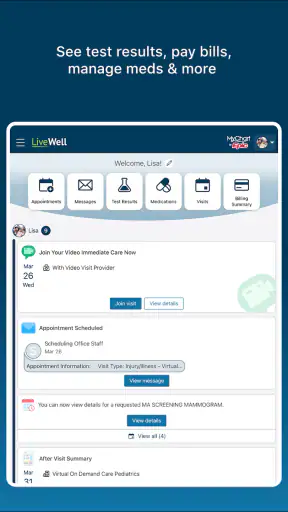

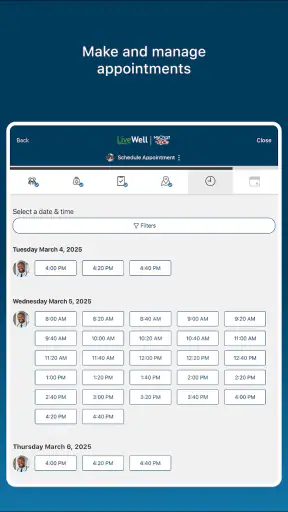
Managing healthcare usually means moving between appointment details, medical records, messages, and practical tasks at exactly the moments when you have the least patience. LiveWell with Advocate Aurora is designed to bring those parts together in one medical app from Advocate Aurora Health. I found its strongest value in reducing the need to remember which healthcare task belongs in which place, although its usefulness depends heavily on whether your care is connected to this health system.
The app is free, available to Everyone, and has grown into a familiar choice in its category, with an average rating of 4.4 from around 17,000 ratings and more than a million installs. Those figures suggest that it has reached a substantial patient audience, but they do not remove the most important question: will it fit the way you actually receive care? I would recommend trying it if Advocate Aurora Health is part of your healthcare routine, while people outside that network should not expect it to replace a general health tracker or a universal medical organizer.
How LiveWell fits into everyday healthcare
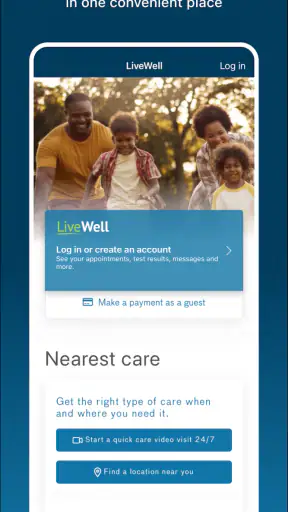
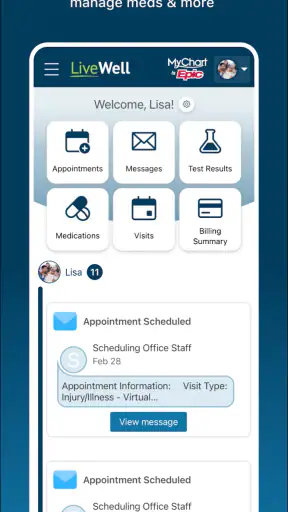
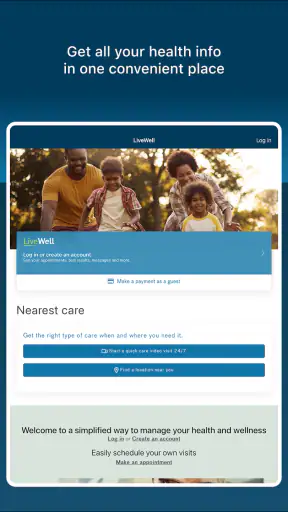
My first impression is that LiveWell is less about novelty and more about consolidation. Instead of treating healthcare as a collection of separate errands, it gives you a central place to work through information connected with your care. That makes sense for patients who regularly need to check details, prepare for visits, or keep up with communication from their healthcare provider.
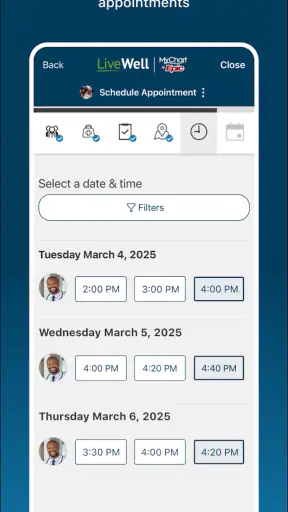
The difference becomes clear in an ordinary situation. Imagine getting ready for an appointment while trying to remember a previous test, locate a message, and confirm the timing of the visit. With a conventional approach, you might search email, open a browser, call an office, and look through paper notes. A dedicated patient app can shorten that chain by putting the relevant account information in the same general workspace.
That convenience is also the main reason I would not judge it like a fitness app. LiveWell is a medical app, not a replacement for professional care and not a broad wellness dashboard that becomes useful regardless of your provider. Its value comes from access to your healthcare relationship. If that relationship is already tied to Advocate Aurora Health, the app has a clear purpose. If not, installing it may add another account without solving a real problem.
The developer is Advocate Aurora Health, which helps explain the app’s focused approach. It is built around the needs of patients using that organization rather than trying to serve every possible healthcare arrangement. I prefer that kind of focus when it creates a smoother path to relevant information, but it also means the app is not the right universal companion for someone who sees several unrelated providers.
What feels quick enough for routine tasks
For a healthcare app, speed is not only about opening quickly. It is about how much effort separates me from the task I came to complete. LiveWell makes the most sense when I open it with a specific reason: checking a healthcare detail, reviewing communication, or preparing for an interaction with my care team. A focused purpose keeps the experience from feeling like another social feed or advertising-heavy service.
I also think the app’s practical speed depends on how organized the user is before opening it. If I know whether I am looking for an appointment detail, a message, or a record, I can move through the app with less hesitation. That sounds minor, but it is an important distinction between a useful patient portal and a digital filing cabinet. The app helps most when I use it as a starting point for a defined healthcare task rather than browse without a goal.
There is a trade-off here. Bringing many kinds of health information into one place can make the first screen feel more significant than a simple single-purpose tool. A patient may need to pause and identify the correct area instead of immediately seeing one obvious action. I would accept that extra orientation because medical information needs context, but users who want a one-tap shortcut for one recurring action may find a direct phone contact or a browser bookmark faster.
LiveWell has been available since March 9, 2015, and its current version is 11.7.2. That long presence matters to me less as a badge and more as a sign that the app belongs to an established patient-service workflow rather than being a temporary experiment. Still, version numbers alone do not guarantee that every screen will feel equally polished on every device, so I would keep expectations practical: routine navigation should be the goal, not instant access to every healthcare task under every condition.
Where heavier use can expose friction
The app becomes more demanding when I use it as a preparation tool instead of a quick lookup. A single visit may involve reviewing several pieces of information, reading a longer message, checking earlier details, and switching between sections. That kind of session is where a healthcare app earns its place, but it is also where organization and clarity matter more than visual speed.
One useful habit is to open LiveWell before an appointment rather than during the final few minutes before leaving. I can review what I need, make a short note of questions, and avoid trying to reconstruct everything while sitting in a waiting room. This is a small workflow change, but it turns the app from a reactive tool into a preparation space. It also reduces the temptation to rely on memory when discussing an important health issue.
Another practical use is handling communication in batches. Instead of checking repeatedly throughout the day, I would set aside a calm moment to review relevant messages and decide what needs attention. That approach is easier on both concentration and battery than constantly reopening any app, and it keeps routine updates from interrupting unrelated activities.
Heavy use can still feel slower than a specialized alternative because a patient portal has more context to protect and more categories to organize. A notes app may be faster for writing personal questions. A calendar may be better for a simple reminder. LiveWell becomes the better choice when the information needs to stay connected to your healthcare account rather than remain as an isolated note.
I would also avoid treating the app as an emergency channel simply because it centralizes healthcare information. If something requires urgent attention, the correct response is to use the appropriate emergency or clinical service, not wait for an app workflow. That is not a flaw unique to LiveWell; it is an important boundary for any patient portal.
Reliability and the confidence problem
Reliability in a medical app has two layers. The first is technical: can I open it and move through it when I need it? The second is practical: can I trust myself to find the relevant information without confusion? LiveWell’s focused connection to Advocate Aurora Health gives it a clearer role than a generic health organizer, and that clarity supports confidence when I am managing care within the same system.
At the same time, I would not keep the app as my only record of something important. A phone can be unavailable, an account can require attention, and a network connection can fail at an inconvenient moment. For travel, an appointment away from home, or a conversation involving several providers, I prefer having essential details prepared in another safe form as well. That is sensible backup planning, not a criticism of this particular app.
The app’s rating of 4.4, based on around 17,000 ratings, is encouraging without being a guarantee of a perfect experience. Patient portals are especially personal: one person may value quick access to messages, while another may care more about how clearly information is grouped. A good average tells me that many users find the service worthwhile, but I would still judge it by the tasks I personally need to complete.
One of my less obvious recommendations is to establish the account and explore the layout before a health issue becomes urgent. When an app is introduced only during a stressful appointment cycle, every unfamiliar screen feels like a barrier. A calm first session lets me learn where common information lives, confirm that I can sign in, and decide which parts of my healthcare routine belong there. That preparation is probably more valuable than trying to optimize the app during a crisis.
There is also a distinction between reliable access and complete personal organization. LiveWell can serve as a useful doorway into care connected with Advocate Aurora Health, but it should not encourage me to stop keeping track of questions, symptoms, medication details, or outside-provider information in whatever method works for me. The best workflow combines the app’s account-based information with my own concise notes, rather than expecting one portal to remember the whole story.
Device limits, operating system, and resource expectations
LiveWell requires iOS 11 or later, so compatibility is an important first check for anyone using an older Apple device. That minimum requirement is not especially demanding by modern standards, but older hardware can still affect the overall experience through slower app launching, limited free storage, or an aging battery. The app itself may be lightweight enough for routine use, yet the phone’s condition remains part of the experience.
I would not install it on a device that is already struggling with storage and expect a healthcare app to solve that problem. Before adding it, I would remove unused applications, update the operating system when practical, and make sure the phone has enough room for normal updates. That is particularly useful for a patient portal because being unable to update or open an app at the wrong time is more frustrating than missing a casual entertainment app.
Resource demands also depend on how often the app is opened and how long each session lasts. Occasional checks for a specific task should be less burdensome than repeatedly refreshing information or leaving several resource-heavy apps active in the background. I would use it deliberately, close it when finished, and avoid turning every healthcare reminder into a reason to check the phone immediately.
Screen size can influence comfort as well. On a compact phone, longer medical messages and detailed information may require more scrolling than on a larger display. A larger device can make reading easier, but it does not automatically make the content clearer. For anything important, I would slow down, read the surrounding context, and avoid relying on a quick glance at a small screen.
People who mainly use Android should verify availability and compatibility in their own app store before planning around it. The key point is not to assume that every healthcare app works identically across mobile platforms. If a preferred device cannot run the app comfortably, the usual alternative may be a provider website, a phone call, or a separate personal record system, depending on the task.
Who benefits most, and who should choose something else
LiveWell is a strong fit for patients whose appointments and healthcare communication are centered on Advocate Aurora Health. It is especially practical for people who dislike searching through scattered emails and notes, caregivers helping an adult keep track of routine healthcare tasks, and anyone who wants one familiar starting point before a visit.
It can also help people who are not naturally organized. Rather than expecting perfect filing habits, the app gives healthcare information a consistent home. My advice would be to use it alongside a short personal checklist: questions for the next appointment, changes worth mentioning, and information from providers outside the system. That combination preserves the convenience of the portal without pretending it is a complete personal health record.
I would be more cautious about recommending it to someone who rarely uses Advocate Aurora Health, sees providers across unrelated systems, or wants a general wellness app with exercise, nutrition, and habit tools as its main focus. A broader health platform may be more suitable for tracking daily lifestyle goals. A simple notes app may be better for private journaling. A calendar may be enough for appointment reminders. The right alternative depends on whether the problem is provider access, personal organization, or lifestyle tracking.
Privacy-conscious users should also think about their own comfort with keeping medical information in a mobile account. I would use a secure device lock, avoid sharing the phone casually, and sign out or protect the device when other people regularly handle it. Those habits are not substitutes for the app’s own safeguards, but they are sensible ways to reduce avoidable exposure on any healthcare device.
My performance verdict after using it as a patient tool
LiveWell succeeds when I treat it as a focused bridge to Advocate Aurora Health rather than as an all-purpose health manager. Its perceived performance is best during short, purposeful sessions, while longer visits depend more on how clearly I know what I am looking for and how well my device handles ordinary app use. I would call it practical rather than flashy, and that is appropriate for a medical service.
The biggest strength is the reduction of scattered healthcare errands. The most important limitation is its dependence on the healthcare network behind it. If that connection matches your care, the app can become a useful routine: prepare before appointments, review information in batches, keep personal questions alongside the official account, and maintain a backup for details you may need when the app is unavailable.
At no cost and with an Everyone age rating, it is easy to test without making a financial commitment. The current version is 11.7.2, and the app has the maturity of a service that has been available since 2015. I would still judge it by a real trial on your own phone: open it when you are calm, find the areas you expect to use, and see whether the navigation reduces effort instead of adding another layer.
My final recommendation is straightforward: LiveWell is worth installing when Advocate Aurora Health is already part of your care. It is not the best answer for emergency communication, universal medical record keeping, or broad fitness tracking, but it can make ordinary patient administration feel more manageable. For the right user, that quieter benefit—knowing where to begin when healthcare tasks pile up—is more valuable than a long list of extra features.
In my view, LiveWell with Advocate Aurora earns its place through relevance and routine usefulness. It will not replace a clinician, a personal health plan, or good preparation, but it can give those things a more convenient digital starting point. If your healthcare relationship fits its ecosystem, I would recommend giving it a careful setup session and then using it with realistic expectations.


